Worktrees
A Task can move into a Git worktree of its own, so that its changes stay apart from your main checkout and from other Tasks. Nothing moves automatically; you ask the agent when separation is useful, and the same Task and conversation continue in the worktree.
Move a Task into a worktree
Ask the agent in the Task, for example:
Prepare this task in an isolated worktree. Leave my current checkout changes in place. Stop when the worktree is ready.
The agent prepares the worktree with a tool Caffold gives it, and the turn ends there. Your next prompt runs in the worktree:
New Task shows these two prompts as a guide. You can send the first one as the first prompt of a new Task, or later in an existing one.
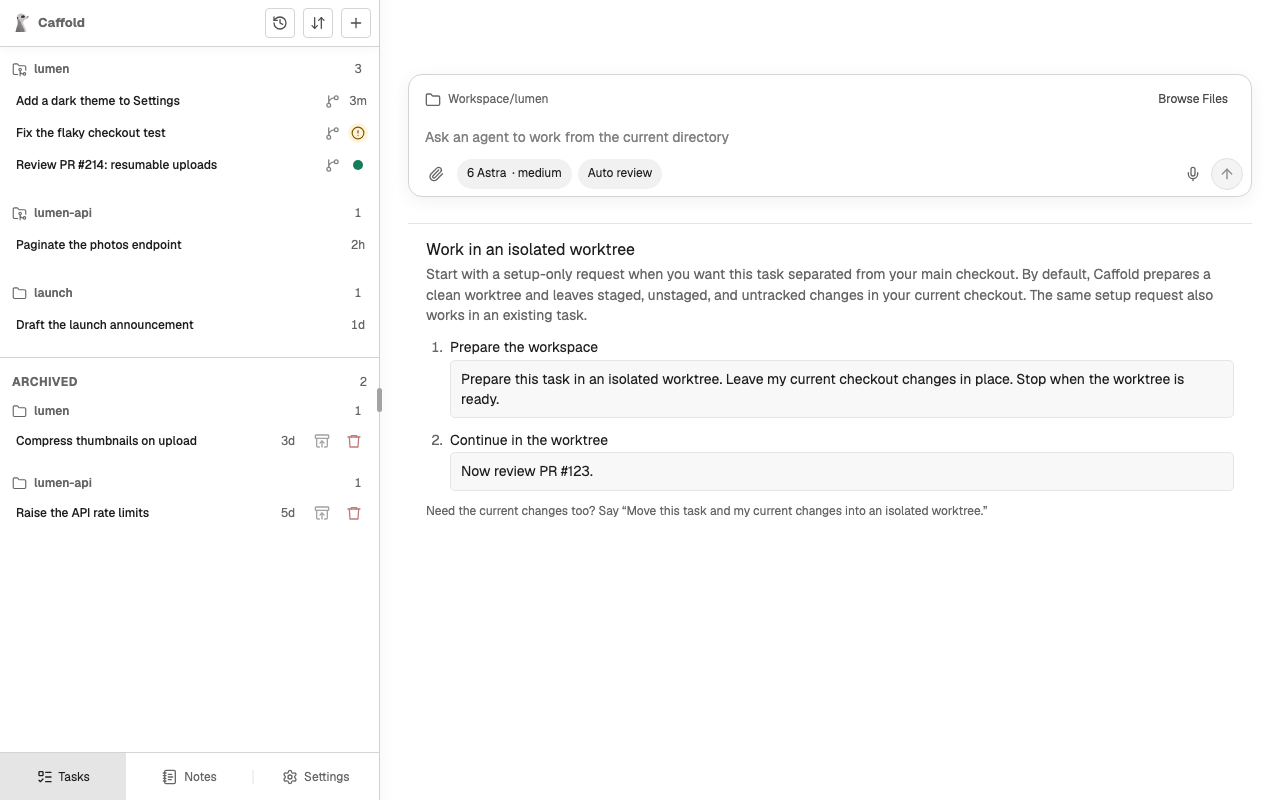
In the Task list, a branch icon marks a Task that runs in a worktree Caffold
prepared. Caffold keeps these worktrees under
~/Library/Application Support/Caffold/data/worktrees.
Bring your uncommitted changes
By default, staged, unstaged, and untracked changes stay in your checkout. To take them along, say so:
Ignored files and build output stay where they are. An unfinished merge or rebase, or changes inside a submodule, stop the move instead.
Which branch the worktree uses
- If the checkout is on a branch other than the default one and has no changes, that branch moves to the worktree, and the checkout switches to the default branch.
- If the checkout is on the default branch or on a detached commit, the
worktree gets a new branch named
caffold/<task-name>-<id>, unless you ask for a name. - A branch with uncommitted changes can move only together with those changes, because Git cannot check out one branch in two places. Ask to bring the changes, or commit them first.
Clean up
Archiving a Task removes the worktree Caffold prepared for it and keeps its branch; see Archive, restore, and delete. Caffold never removes a worktree it did not prepare, and never deletes a branch.