GitHub
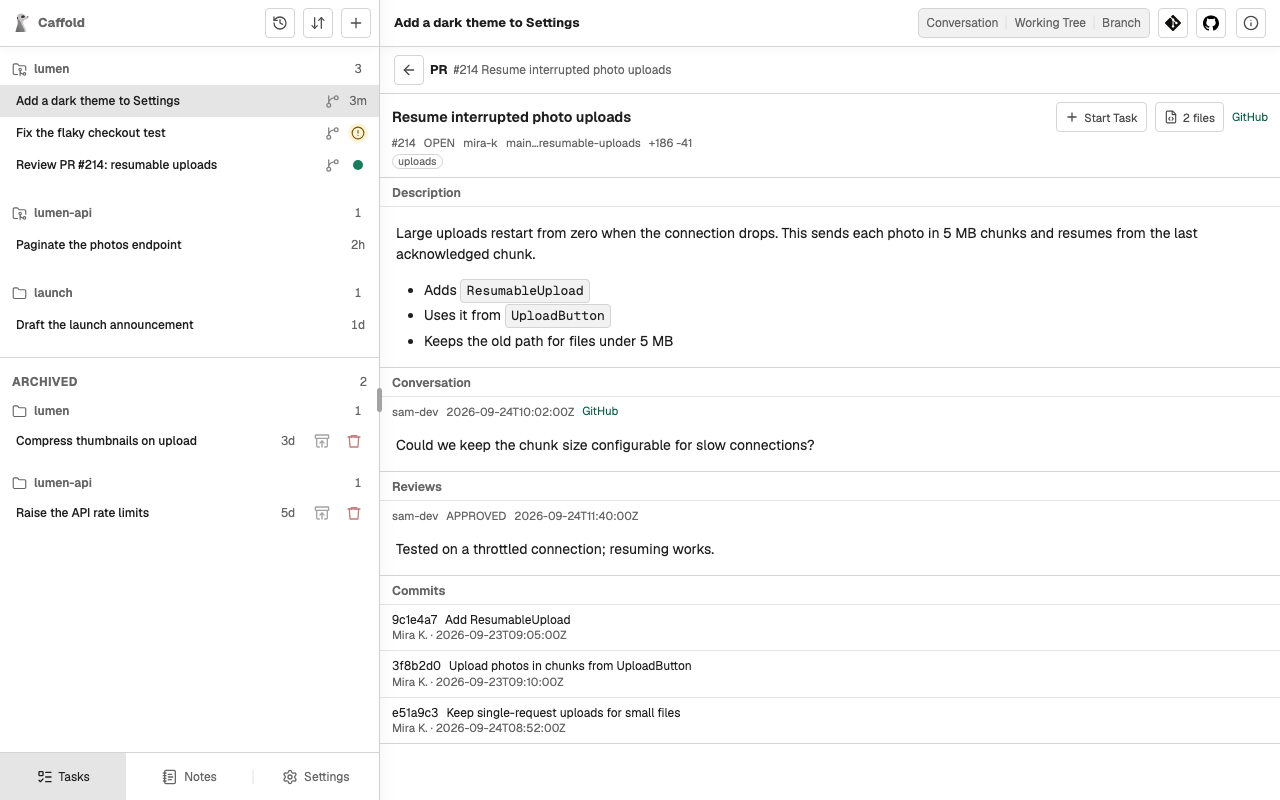
The GitHub button, with the GitHub logo, at the top of a Task or a repository Section shows the repository's Issues and Pull Requests, and can start a Task from one of them. Caffold reads GitHub and does not post comments, reviews, or Pull Requests.
Set up
GitHub views use the GitHub CLI on the Mac, signed in to your account:
Caffold finds the GitHub repository from the Task's or Section's Git remote. Without the GitHub CLI, only the GitHub views are unavailable.
Read Issues and Pull Requests
Issues and Pull Requests list the repository's Issues and Pull Requests. An Issue shows its description. A Pull Request shows its description, conversation, reviews, and commits, and its file count, such as 2 files, opens its changed files with their diffs.
The lists are read when you open them; they do not update on their own.
Start a Task from an Issue or a Pull Request
Start Task creates a new Task for the Issue or Pull Request. It asks for a model, and for an Issue also for the base branch to start from. The new Task then:
- names itself after the Issue or Pull Request;
- prepares its own worktree with a new branch: from the base you chose for an Issue, or from the Pull Request's head;
- stops, and waits for what you want done next.
Caffold tells the agent to read the Issue or Pull Request as information, not as instructions. Tell the Task what to do, for example "Review this Pull Request" or "Fix this Issue".