Review changes
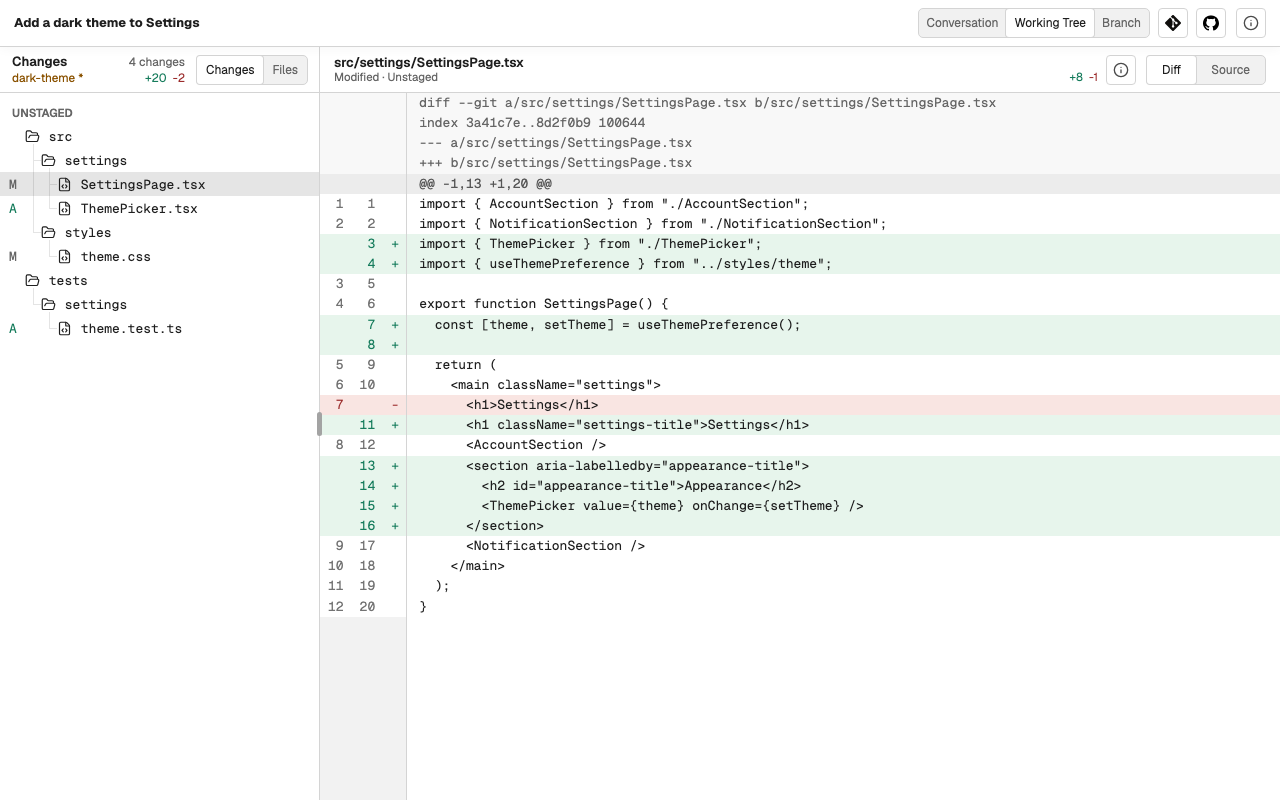
Next to its conversation, a Task shows the actual files and diff of the repository it works in, so you can judge the result yourself.
Open it
In a Task, choose Working Tree or Branch next to Conversation. A Section of a repository offers the same view without a Task.
- Working Tree shows the changes that are not committed yet: staged, unstaged, and untracked.
- Branch shows everything the current branch changes compared with a base branch you choose.
The view follows the files as they change, so you can keep it open while the agent works.
Find a file
The left side lists either:
- Changes, the changed files grouped by folder, each marked with its kind of change; or
- Files, the whole repository, to read any file.
Settings → Files chooses whether folders come before files in these trees.
Read a file
The right side shows the selected file in one of these ways, as the file allows:
- Diff, the unified diff of the change, with line numbers on both sides;
- Source, the whole file as text;
- Preview, for Markdown, images, and PDF files.
On a phone, the file list and the file take turns on the screen; Back returns from the file to the list.
Act on what you found
Go back to Conversation and tell the agent what comes next: a fix for what you found, or a commit. For example:
To compare any two refs or read the commit history, see Git.