Archive, restore, and delete
Archive a Task when you are done with it. Archived Tasks leave the active list but can come back, and only an archived Task can be deleted.
Archive
Open the Task, choose Task details at its top right, and choose Archive task.
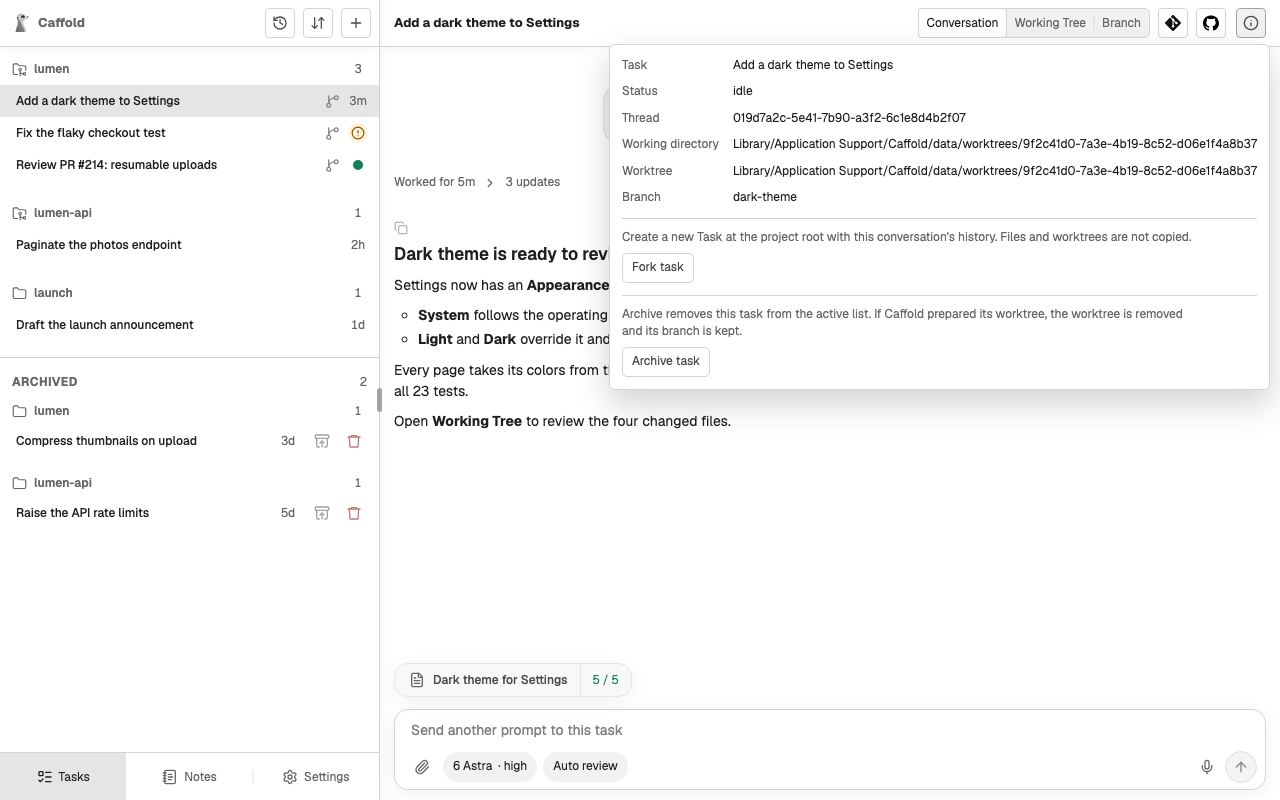
- A Task that is still running cannot be archived; stop or finish its turn first.
- If the Task runs in a worktree Caffold prepared, the worktree must have no uncommitted changes, including new files Git does not ignore, such as uploaded attachments. Caffold then removes the worktree and keeps its branch.
- Caffold also asks the agent to archive or close its conversation. If the agent cannot be reached, the Task is archived anyway.
Restore
Archived Tasks are listed under Archived at the bottom of the Task list. The restore button on an archived Task's row returns it to the active list, recreates its worktree from the kept branch, and reopens the same conversation. Restore is available once the agent confirms that the conversation still exists.
Delete permanently
The delete button, a trash can on the same row, asks for confirmation, then deletes the agent's conversation and Caffold's record of the Task. Your local Git branch is kept. Deletion cannot be undone.