Sections
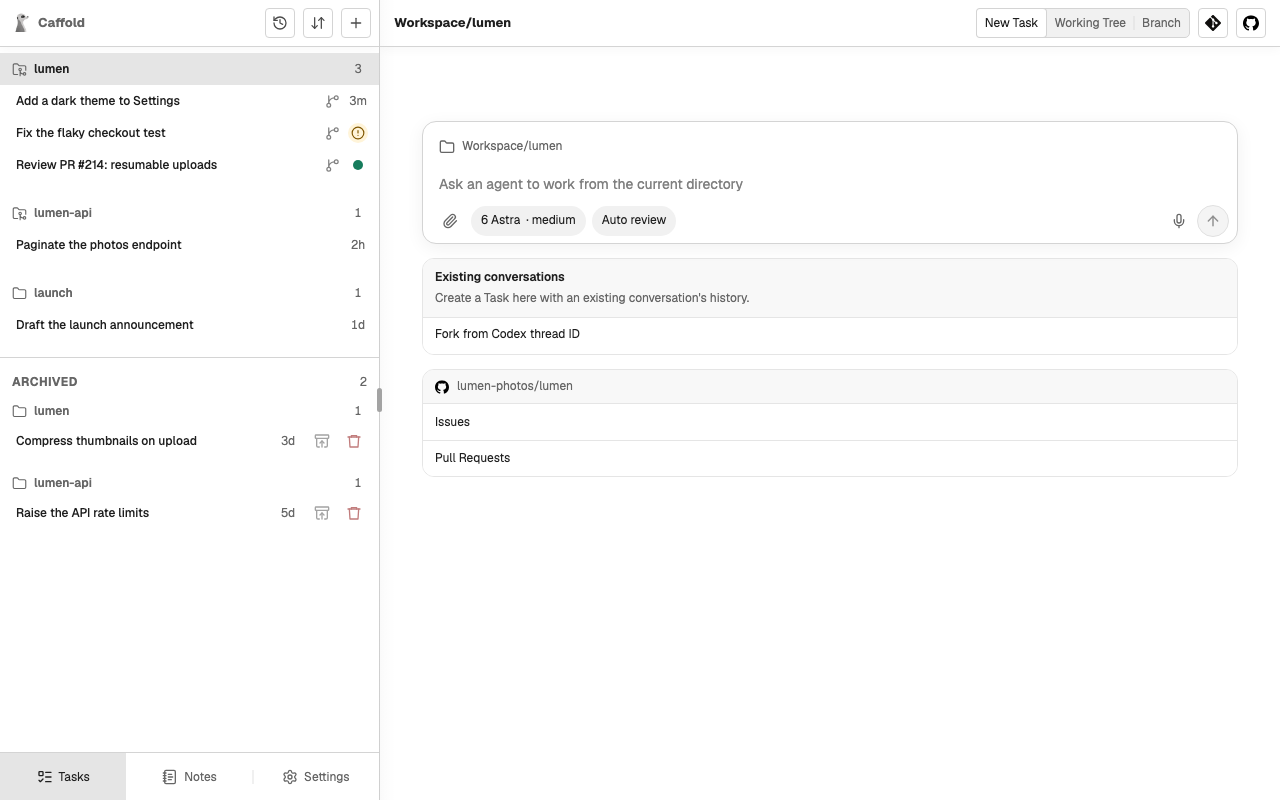
The Task list groups your Tasks into Sections. A Section is a directory: the first Task you start in a directory creates its Section, and later Tasks there join it. A Section is listed for as long as it has active Tasks.
A Section whose directory is a Git repository shows a repository icon. Tasks that move into a worktree stay in their repository's Section, marked with a branch icon.
Open a Section
Select a Section's name to open it. An open Section offers, for its directory:
- New Task, which starts a Task there with the model, reasoning level, speed, and approval mode of the last turn started in that Section.
- For a repository, Working Tree, Branch, Git, and GitHub, which show the repository itself without opening a Task. See Review changes.
- Existing conversations, which forks a Codex conversation into the Section. See Fork a Codex conversation.
Reorder
Choose the reorder button at the top of the Task list, then choose whether to move Tasks within their Sections or move whole Sections. Drag the rows into the order you want; press Esc or choose the button again to finish. The order is kept on the Mac, so every screen shows the same list.
The Task Switcher lists the same Tasks by when they last finished instead, without changing this order.